
Hello everyone,
so originally, I wanted to share this only after our “Practice-January” but I’m kind of too excited to wait any longer, so here we go :).
I have finally tackled and finished an upgrade that I have been wanting to do for a while:
YDG Dictionary Examples 2.0 – More and better
And it’s actually kind of a two part upgrade that tackles:
a) How the examples that I made are displayed, and
b) What happens for the entries where I don’t have hand made examples.
And there’s actually a third little thing that you might have noticed already that has to do with what happens where there are no results.
So… let’s take a look!
The New Display
In my dictionary, I have about 6.500 examples that I have written myself. Many come directly from the articles, but a growing number is also written specifically for the prefix verb game that you helped fund.
So far, the examples for a word or phrase were displayed as a list in a separate section of the entry, but there was one flaw – for words that have several meanings (and German has a lot of such words) you couldn’t immediately tell, which example belongs to which meaning.
That is different now, because in the new version, the examples will be displayed RIGHT under the meaning they illustrate. So if a verb for instance has three separate meanings, you’ll have three separate example sections. Here’s how it looks:
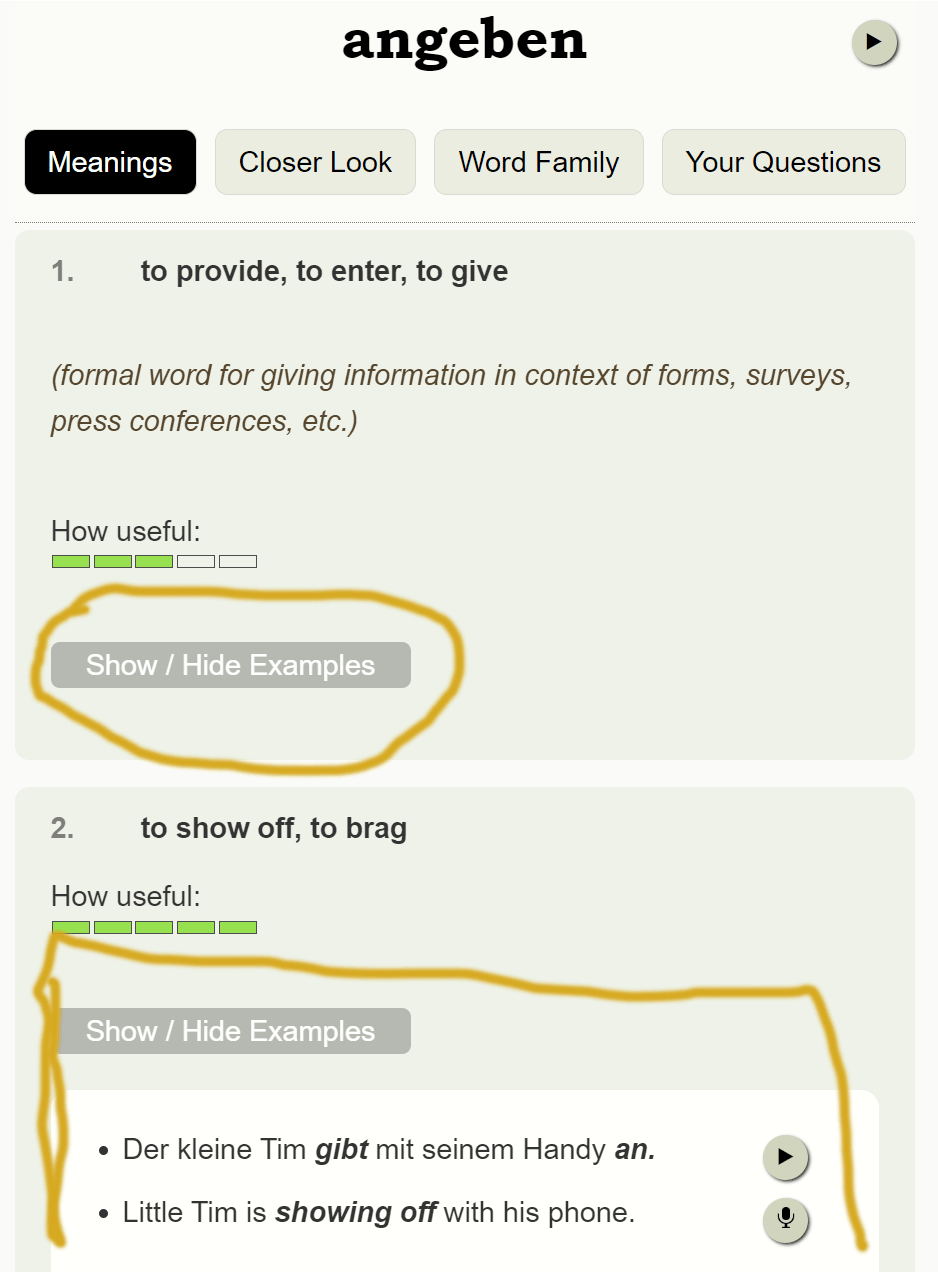
And as you can see, they’re expandable, so you can see all the meanings on one screen at first.
Cool. And now let’s check the second part.
Create new examples
So I have “handmade” examples for about one third of the entries. For the other two thirds, I have so far done a fuzzy search over the existing examples to see if there happens to be the search term in there somewhere. That was not idea though, because when you searched for “Schrei” (the scream) for instance, you’d get examples for schreiben as well.
When ChatGPT came out last year, I was initially really excited because it seemed to be just what I needed. An AI to create missing examples. But then I did some testing and I just wasn’t satisfied with the overall quality. 70% of the examples it created were good, but 30% were weird, missed the meaning or were downright wrong.
But the models got a bit better and a few weeks ago, I had a small epiphany how I could potentially have the AI create idiomatic examples for the exact sense that I want. So I tested it out again, and it actually worked :D.
It’s not 100% perfect, but way way better than it used to be. And so now I have actually added it :)! Yeay… you have no idea how happy I am about this.
If an entry doesn’t have examples, you can just press a button and you’ll get some, including translation (and yes, text to speech is up next).
Here’s how it looks, with an example already created:
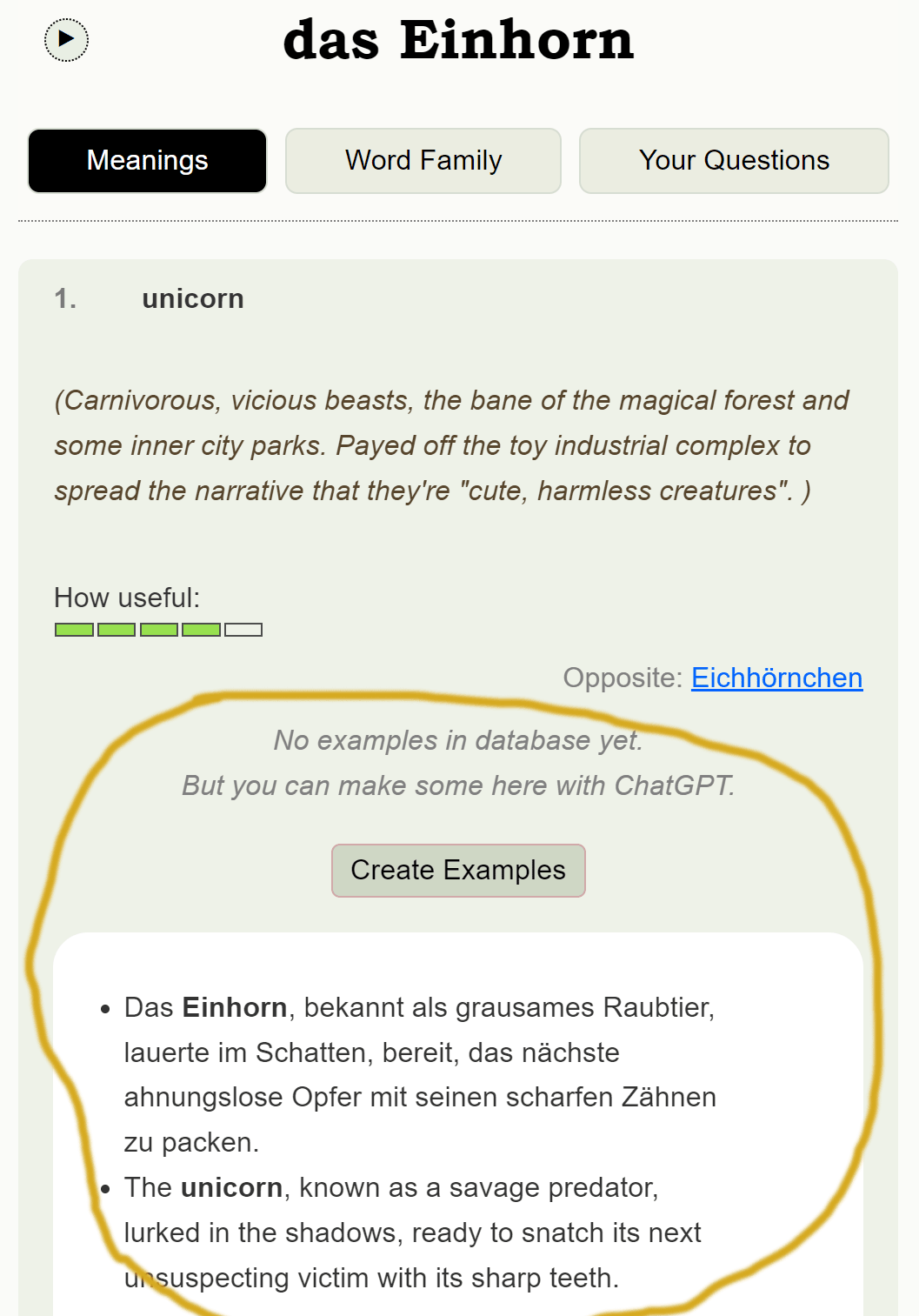
And the cool thing is that for words that have several different ideas, you can create examples for each idea separately. That was a big issue a while back, but I think I have solved it :).
Oh and what’s also cool is that depending on the wordtype I am telling it to create different “types”. So for verbs for instance, you’ll get the following:
- present tense
- past tense
- conditional
- question
For adjective, on the other hand, you should get:
- one predicative use
- one attributive use
- one comparison
- one superlative
And for nouns, there’s one in singular and one in plural. So you can see all the relevant forms in action.
I haven’t created schemes for all word types yet, but verbs and nouns and adjectives are there already :).
I’m thinking about adding an option to save them to the database, as well, but I’m really curious for your feedback first.
Anyway, so those are the two big updates.
And now for the third one
Ask ChatGPT for Results
So far, when there was no result for your search, I offered a bunch of similar words, but that was mainly to catch typos and so on, but wasn’t really helpful for words that really aren’t in there.
Now, you have the option to ask ChatGPT about it, and you’ll get a translation, an example and some interesting trivia about the word. Well… if there is any. I for instance looked up “jedem das seine” and learned that it was actually written across the gate of the KZ Buchenwald. I didn’t know that, so that was surprisingly interesting. And just for the lulz, I have made it, so ChatGPT gives some of its own “thoughts” as well, which are sometimes really deep.
So yeah… those are the big updates, and at least for those of you who are using the dictionary regularly, they’ll hopefully improve the experience a lot.
And yes… I will add them to the dictionary Chrome extension, as well :) (you can download the extension here... works on Chrome and Brave browsers)
I’m really really curious about your feedback so if you have some thoughts about the new features please let me know in the comments.
I really hope you like it, have a great day and I’ll see you soon with another excercise. Probably for sentence structure ;)

 Audio Speed
 Dark Mode
Only necessity of knowing makes me get free joining.
I love you, Emanuel, in a grandmotherly way.
Cami ps need a goofy icon for future comments to you.
I am old. Pre-black and white tv. I live in Cal. USA
How to pay? Please give me a password and method of payment.
How to reach dictionary?
Not to old to learn but jargon and initials are new era and age slows me down
Cami from Cali, awesome :).
You can reach the dictionary just by searching for a term using my search (at the top of the page).
And as for membership, you either need credit card or paypal and you can set up everything here:
https://yourdailygerman.com/german-is-easy-member/
Great to see how far this has come
Broooo, how are you :D? It wouldn’t have been possible without you, man!
Having the examples divided out by meaning, that’s definitely helpful. I imagine that might have been a lot of work. Are they collapsed by default to save space? I kind of liked having them just there (plus the text column was a little wider then), but maybe I’m in the minority. I rarely use the dictionary on my phone.
If the AI examples were added to the database, would that mean that one person could generate an example and everyone else could see it? Would there be a limit on how many examples could get added, or some way to pick which ones get added?
I can only speak for myself, but I tune out when lists get too long. And it does sometimes give you wrong examples (to be fair, I was actively looking for them). I could see it causing confusion if those get added without correction. Unless maybe there’s a way to tell if they’re AI-generated.
I’m not crazy about AI-generated text, but this does seem to work pretty well. It’s clearly been trained on forums.
I have to say i prefered having the examples automatically visible. I will almost always look at them so now there is extra work to uncollapse them.
I am not against people using the ai tool for themselves but I would have issues if ai generated examples were added to the general database for all to see – especially without being checked by Emanuel.
I like the definitions on this site because they have ofen have so much of Emauels’ humour and personality – most dictionary definitions are generic as fuck – here we have demonic unicorns, beer, and the ongoing soap opera of Maria and Thomas.. maybe i am underestimating ai but i don’t really associate it with having much personality …
Perhaps Emanuel can use Ai as a tool to help expand the dictionary because i understand it takes a lot of time to create new entries, but I wouldn’t like this site to swamped by user generated generic ai bloat. My understanding however is this isn’t the plan…
So I think mid term, I’ll add an “always visible” switch for members. I just need a bit of a break from this part of the software :).
I’d DEFINITELY review examples before officially adding them. But there is no way I can ever hand write examples for all the entries in the dictionary. It’s just too much.
As for adding new entries… that’s not really a thing I want to hand off to anybody, neither AI nor person. I kind of enjoy doing that, even though I don’t have as much time for it right now as I would like to have.
Kind of, yeah.
I think the main issue when they’re expanded is that people who are not regular users of the dictionary may not realize that there is more than one meaning. I wanted all the meanings to be visible.
What I can imagine adding is a “default” switch, so they’re collapsed by default, but you can change it in your settings so they’re always visible.
As for the AI examples… I would DEFINITELY review them and then only keep the ones that I like, and as soon as there are some entered in the database, the option to create more would disappear.
One of the key aspects of my dictionary, besides building it around ideas, rather than words, is that it’s completely curated. Unreviewed AI examples would ruin that for sure.
It’s the only dictionary I know where I read it and right away get the feeling “da steckt Herzblut drin”.
I need a German word for beyond hysterically funny to describe you !
Great update! Worked first time when I switched to Chrome browser auf meinem Handy. Leider Firefox (my default browser) funtz net (Jan. fav. phrase). Text to speech would be the icing on the cake!
Öffi-Nutzer.
I just tried it with Firefox and it worked, so I think it’s an issue with an outdated script. You can try ctrl+f5 to fully reload the page, but chances are it’ll sort itself within a few days :)
Emanuel, you always amaze me by your creativity….I use your dictionaty almost everyday…..I have “Emanulaised” my German:))
I forgot to say that the button ” ask the AI ” does not work Enanuel….I searched ” ambulant” there was no entry and then I clicked on the button but nothing happend. I use Crome& cell phone .
It might take a few days till your phone loads the new scripts :). It’s a browser cache thing.
I think if people find this useful its a cool feature. Personally I don’t trust really AI enough to see myself adopting it, but thats just me. Sorry to be the voice of doom and gloom here, but you did ask for feedback : )
edit: dunno maybe i should be more open minded and give it a try at least…
Do you mean “trust” in a sense of you don’t trust the results or do you mean “Trust” in a deeper, evil AI kind of way?
I am quite sceptical about the capabilities of ChatGPT overall, that’s why I waited so long with the example generation for the dictionary. I honestly had scratched that idea already last spring.
But that changed with my small epiphany. Trust me… I still hate the idea of there being 10% wrong examples. But I think it’s an overall gain now, whereas 30% nonsense examples was just too much.
I would be very sceptical of AI explaining grammar or word usage though, like what you see in many new language learning apps now. You never know what you’re getting there :).
I mean, its not like i think ai has become sentinient and wants to sabotage my german-learning process…
Its more if i invest time learning something and put time into memorising a new word I want to be memorising the right meaning. Memorising stuff takes me a fair bit of effort – i don’t really pick up words without putting in time.
I’d rather take a few minutes to cross reference your definition with Dwds, Duden and Linguee than rely on chatgpt.
Oh yeah, that makes perfect sense. ChatGPT is not 100% reliable.
DWDS is so good, I usually don’t bother with Duden. Plus it’s not infested with ads. Wiktionary and Leo (including the forum) are good too. Also redensarten-index.de and sprachnudel.de for colloquial words and sayings.
I wasn’t aware of redensarten-index or spruchnudel- thanks for the recommendations – will check them out.
I used to kind of love the ads on Duden because they were so trashy but i installed uBlock Origin and I never see them any more, which i am to be honest a lot happier about.
I feel like I might have been a bit dismissive of Leo early on in my learning process becuase it tends to give one word definitions. These are often words with multiple meanings but the translation only works for one of the senses. So ts quiet easy to get confused.
But I actually have started to come back round to it – i heard recently the forums have a lot of useful info- i’d never really looked there before but there does seem to be some good stuff there… The site can also be good for quickly checking when you know the word already and just want to check which Artikel it takes or something.
My one complaint about DWDs is that a table of a verbs’ complete conjugated forms seems not to be a thing there.
verbformen.de is pretty good for conjugations. I like the layout and colors.
DWDS gives you the three forms you need to figure out the rest. So like for “sehen”:
er/sie/es sieht, sah, hat gesehen
Once you know the basic conjugation rules, you can memorize those three forms and work out the rest from there. For most verbs, anyway. Things like “sein” and “wollen” are just special.
Yeah, I like the design of verbformen as well!! It’s so clean and easily parsed visually.
well yeah, true, but i somehow like seeing all the forms. All the obscure forms like konjunktiv 1 are somehow kinda fun to look at… maybe thats just me
Yes. I like the Duolingo app for vocabulary erc but it falls short on explaining why the language is this way. I’m one of those people who HAVE to know why. Emmanuel does this beautifully.
Hallo,
I use your dictionary A LOT and had already seen the AI feature to create examples. The new features you’re adding are making the dictionary better and better, so I think it’s going in the right direction and I, for one, find them MEGA useful.
Bis bald!
You failed to mention the update in the UI of the Bell icon thingy. :)
This is going to sound sycophantic, but many times I wish I could click a thumbs up icon in the comments section. I learn so much from reading those responses that I think seeing that others have also benefited from a message response might be an interesting ‘datapoint’ to capture. Also for what it is worth, I tried this on Safari and everything (including CGPT creations) was smooth.
Ha, nice you noticed it :). This was just a layout change though, I don’t really ever shout these out.
Funnily enough, the comment system that I am using does offer the option to vote on comments, but I have turned it off, because the overall response for the article rating is really low. Like… an article will get read 3000 times, but there are only 12 votes.
So I would imagine that comments get even less, and my concern is that pulling the ratings from the database will slow down the site. Not for you as a user, you won’t notice it, but Google does notice it and it’s a constant battle to make the site load faster. I actually spend like 5% of my time just on that.
But I also see how it can be fun to like comments and there’d also be a “sort by popular” option.
Maybe I’ll do some speed test at some point.
Yes, keep the functionality of the site über alles. When I read a German book on my Kindle app, there are passages that are already underlined showing where others have thought a phrase is notable enough in some way to be marked/highlighted. I have to say, I rarely want to mark those same phrases. I think everyone is searching for their own unique content to make their own journey through language learning the best. Right now I am highlighting verbs and da-compounds that are auf related (sich Konzentrieren auf etwas, usw), and probably I am the only person who thinks this is important to their personal journey to mark.
Ich bin begeistert davon, dies zu nutzen. Besonders werden meine Verben endlich viel stärker werden. (Zwei werden?)
Ich bin dankbar für alle die Arbeit, die Sie im Laufe des Jahres geleistet haben.
Übrigens, paid steht für Geldtrasaktionen, und payed steht für das Auslassen von Seilen. Das ist der einzige Ort, an dem es einen Unterschied für dieses Wort gibt. Ich vermute, dass diese Unterscheidung allmählich verschwindet wird. (Weil dumme Autokorrectur…) :-)
Ja, zwei “werden” ist richtig!!
Hooray! Sprachgefühl gewinnt!! :D :D
Wow, how exciting…I look forward to trying these updates out!
Not sure if this was intentional or a bug, but I went to a dictionary entry and just started scrolling down the page. The bit at the top of the page where it lists the word and the links to the various sections (e.g. “Meanings” “Closer Look” “Word Family” “Your Questions”) remains on the screen as you scroll down and obstructs whatever is behind it. It takes up quite a bit of space on the screen. If you need a screenshot, I can email it. I’m using Chrome, btw. Is this happening on your side too?
It’s meant to be that way, because it’s the navigation essentially, and it shows you what word you’re at. I know it’s not ideal, but I haven’t found another design yet that I like and that allows to quickly jump between the sections. It’s a tradeoff basically. The way it is now, it’s less scrolling for the user, but also a smaller display.
Ok! Personally, I’d take the other side of the trade-off. I’d rather scroll through the page than have a navigation menu that blocks part of the screen. I find myself fiddling with it to align the text I want to read in the reduced space beneath the navigation menu (maybe it’s better on a bigger screen). That being said, I understand if you / others feel differently.
More disheartening is the “Create Examples” button doesn’t seem to do anything for me, even on the Einhorn entry in the screenshot. I click and nothing (even after waiting some time). Just me?
Also, the “Show / Hide Examples” text (for definitions that contain your own examples) does not intuitively look like something you can click on in the UI. Maybe adding an arrow icon or altering the text somehow might be an improvement?
That’s all the feedback I have for now. :) I’m excited about these new features! Congrats on figuring out a solution to this!
What happens when you click on “Create examples”? Any changes to the UI or just nothing? It might be a javascript issue that’ll solve itself over the next few days, as the browsers load the new script.
Nothing happens. The button is obviously clickable (the mouse icon changes to a hand), but nothing happens post-click. I’ve tried it on a few different nouns. I’ll give it a shot again later this week. Thanks!
Since you’re on Chrome, you can also try ctrl+f5. That loads the entire site anew including all updated scripts.
that did it! it also made the navigation thing at the top a bit better…and addressed my other comment about the text…feel free to delete this thread now… *hides in corner*
Come out of that corner immediately, Private Mateo!!
Seriously, I need user feedback like this. I’m not a designer and a lot of what I do here is trial and error.